Single receipts are easy to automate. An Uber receipt has one date, one vendor, a subtotal, a sales tax line, and a final charge. You snap a photo or forward the email, an extraction model parses four key-value pairs, and a row appears in a spreadsheet.
Then the monthly credit card statement arrives.
Four pages of dense, two-column transaction feeds. Forty-eight individual line items. Foreign exchange transaction fees scattered throughout. Multiple employee cardholders on a single commercial account. And at the bottom, an opening balance, payments, credits, finance charges, and a closing balance that must reconcile to the exact penny.
If an automated ingestion tool drops a single transaction or misreads an $8.90 charge as $8.00, your entire month is out of balance.
Instead of saving time, you are stuck conducting a forensic search across 48 rows of numbers on a Sunday night trying to find the missing ninety cents.
When we engineered Transit Ledger, our goal was never to build just another generic receipt scanner. It was to build a private financial operating engine inside Google Workspace™.
Today, we are launching Statement Mode into production—a dedicated pipeline designed specifically to deconstruct multi-page bank and credit card statements into balanced, multi-tab workbooks in Google Sheets™.
1. The Engineering Failure of Traditional Document OCR
Most document extraction tools fail on financial statements because of a fundamental architectural blind spot: they treat a multi-page statement as a bag of disconnected text.
When traditional expense software ingests a 4-page statement PDF, one of two bad outcomes happens:
-
The Flat-Dump Failure: The tool attempts to parse the document as a single massive receipt. It extracts the ending balance as the "Total", labels the entire document with the bank's name, and completely ignores the 48 underlying transactions.
-
The Fragmented-Row Dump: The tool chops the PDF into dozens of isolated receipt rows and dumps them into a spreadsheet without verifying the closing balance. There is zero continuity, zero sub-account grouping, and zero reconciliation between the line items and the statement summary.
Worse, standard OCR engines never verify their own extraction. If the model hallucinates a vendor name or drops a row during a page break, it silently outputs incorrect data.
In accounting, unverified output is worse than manual data entry—because bad data forces you to do the work twice: once to spot the discrepancy, and once to fix it.
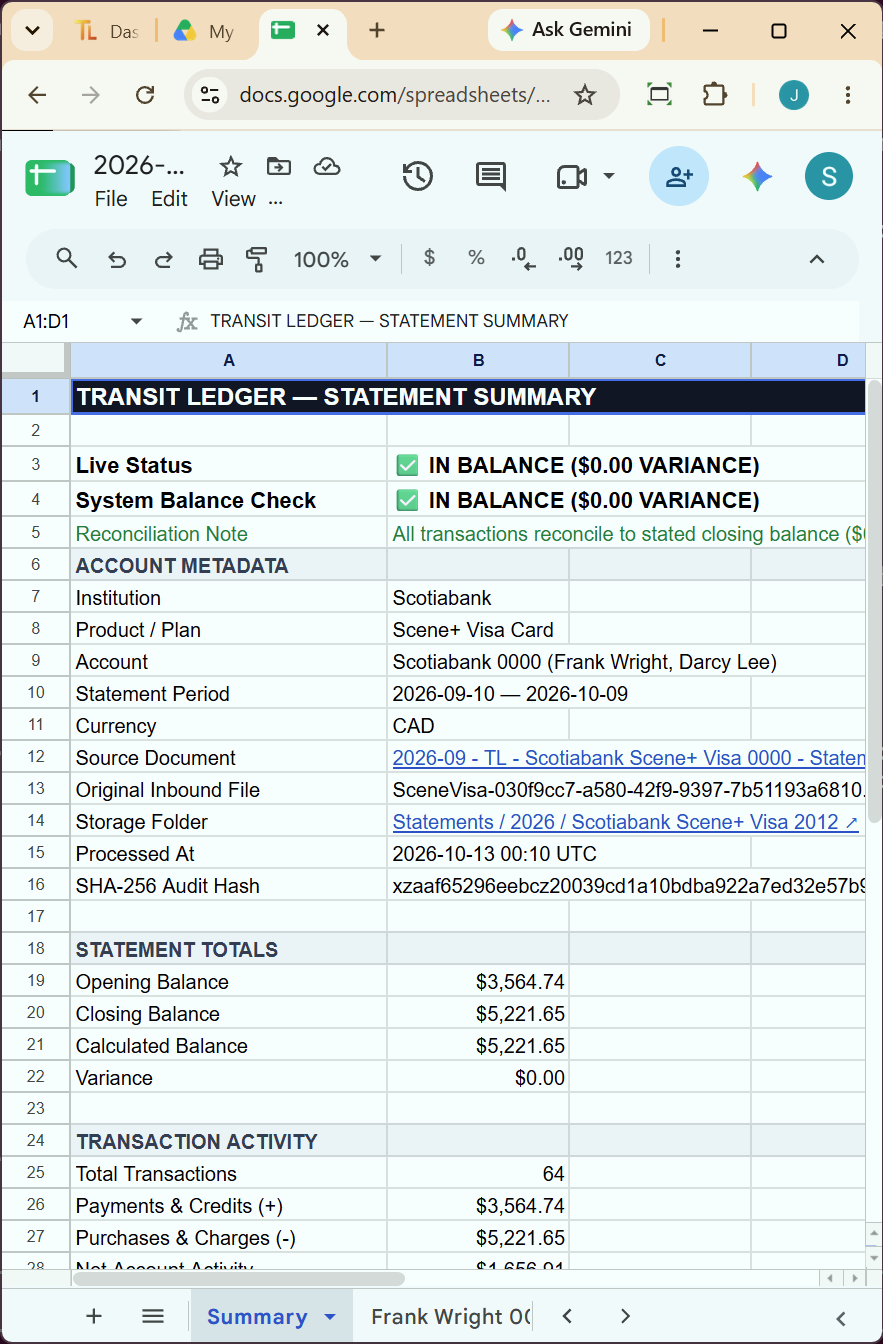
2. The Solution: Automated Balance Verification ($0.00 Zero-Variance)
Accounting does not run on probabilistic guesses. It runs on exact balance equations.
When Statement Mode processes an incoming bank or credit card statement in Transit Ledger, it runs the document through a two-phase deterministic pipeline:
- Balance Anchors: Identifies Opening Balance, Payment Credits, and Closing Balance
- Cardholder Segmentation: Isolates individual employee cards (Card A, Card B, Sub-accounts)
- Transaction Normalization: Standardizes dates, merchant descriptions, net amounts, and tax splits
The system verifies the core financial invariant:
Opening Balance + Purchases − Payments/Credits = Closing Balance
If the sum of extracted transactions matches the statement's stated closing balance to the penny, Transit Ledger stamps the record with a $0.00 Zero-Variance verification badge.
If a row is obscured or a page margin cuts off a digit, the system does not silently fudge the numbers. It flags the exact difference directly in your ledger cell, with a direct clickable link to open the filed statement in Google Drive™ without hunting through email threads or desktop downloads.
3. The Dual-Pipeline Architecture: Statements vs. Itemized Invoices
As we field-tested this engine with operational bookkeeping partners, we discovered a second related headache: dense multi-line supplier invoices.
A contractor buying parts from a supplier like Home Depot or an industrial distributor might receive a single 3-page invoice containing 42 separate line items (nuts, bolts, lumber, electrical conduit).
-
In your main bookkeeping ledger, you need a single consolidated row: $4,850.00 to Materials with tax split.
-
But for project job-costing, inventory management, or client billing, you need every single SKU, quantity, unit price, and line-item total itemized.
Statement Mode solves this with a Dual-Pipeline Architecture:
-
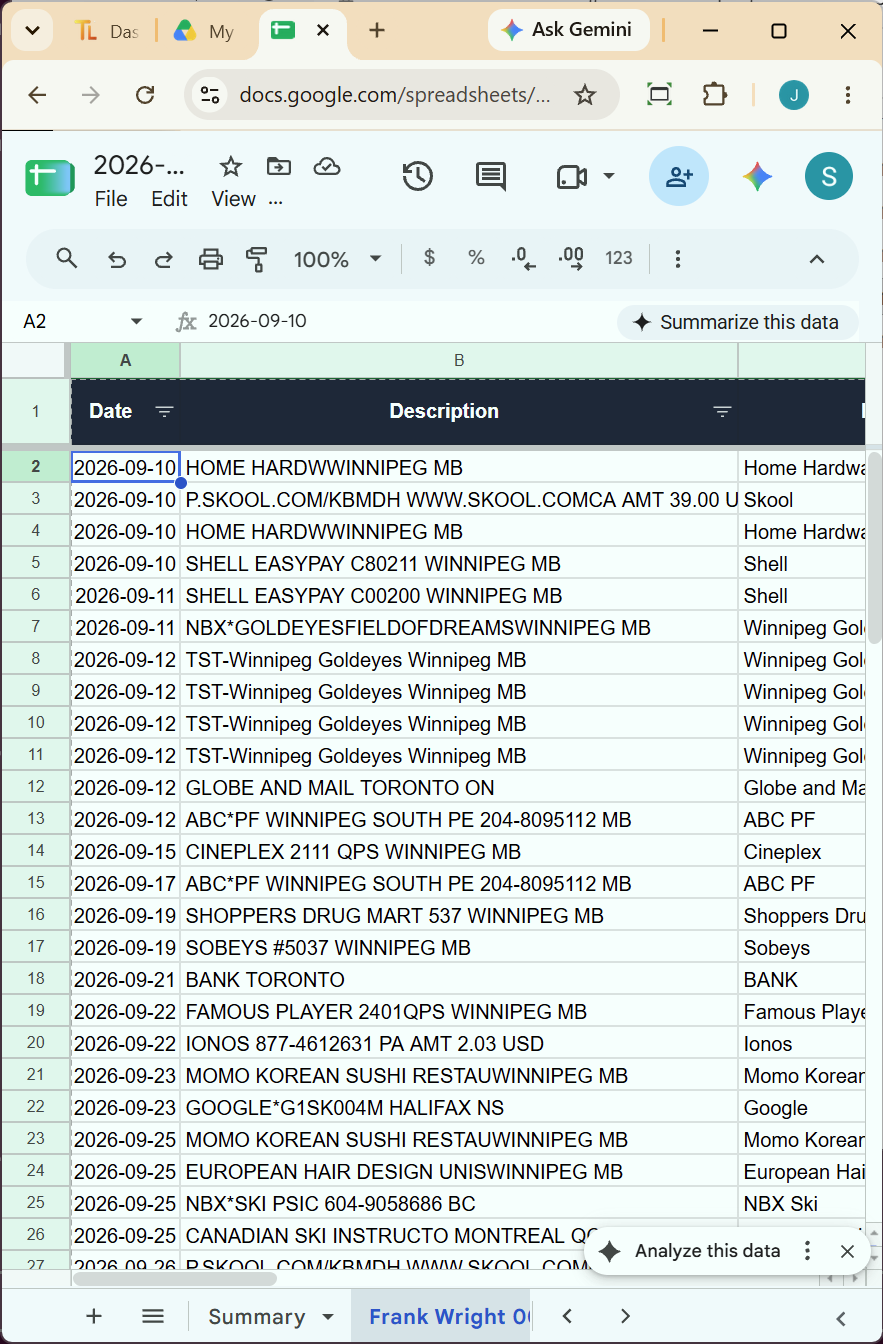
Master Statement Pipeline: Built specifically for monthly statements issued by banks and card providers (Visa, Mastercard, Amex, Scotiabank, RBC, TD, Chase). Deconstructs multi-page statements into dedicated workbooks featuring balance summaries, cardholder breakdowns, and chronologically indexed transaction feeds.
-
Itemized SKU Pipeline: Built for complex supplier and trade bills. Creates a consolidated master entry in your quarterly expenses sheet, while generating a dedicated companion breakdown tab detailing every individual part number, quantity, and line-item cost.
Both pipelines file the original source document directly into your Google Drive—including shared drives in Google Drive—keeping client and departmental folders cleanly segregated.
4. The "Fair Billing" Guarantee: Stop Paying for Legal Fine Print
One of the most frustrating practices in document processing software is blind page billing.
A typical commercial credit card statement might be 5 pages long:
-
Page 1 & 2: Account summary and transaction feeds.
-
Page 3: Interest rate calculation formulas and dispute procedures.
-
Page 4: Arbitration disclosures and terms of service updates.
-
Page 5: A promotional marketing flyer for bonus travel reward points.
Under conventional document pricing, you are charged for all 5 pages—even though 60% of the document contains zero financial records.
We rejected that model entirely.
Inside Statement Mode, we built our Fair Billing Guarantee:
-
Transit Ledger evaluates each page layout before deep parsing.
-
Non-financial pages—blank trailing pages, terms and conditions disclosures, arbitration agreements, and marketing flyers—are classified as non-transactional and automatically waived at zero credits.
-
You only draw credits for pages that contain actual, ledger-bound financial records.
5. Zero Database Retention: Complete Data Sovereignty
The standard SaaS paradigm requires you to upload your sensitive financial statements to a vendor's centralized cloud database. If that vendor suffers a credential breach, your corporate card numbers, bank account balances, and vendor relationships are exposed.
Transit Ledger operates on Zero Database Retention:
-
Inbound statements are processed through an encrypted, stateless worker.
-
Extracted rows and balances are written directly into your Google Sheets.
-
Original PDF statements are filed directly into your Google Drive or shared drives in Google Drive.
-
No copies of your statements, spreadsheets, or financial numbers are stored in our databases.
If you ever stop using Transit Ledger, you don't have to export data or pay an exit fee to retrieve your records. Your entire financial history, year-by-year folder structure, and linked statements remain permanently in your own Google Workspace account.
6. Now Live in Production
Statement Mode is live in production today for all Express, Transit, and Overdrive plans on Transit Ledger.
Whether you are a solo founder drowning in monthly corporate card PDFs, a fractional bookkeeper managing five client entities, or a business owner tired of spending Sunday evenings doing manual data entry, your bookkeeping paper trail belongs where you work: inside Google Sheets™.
Sign in with your Google account to get 50 free credits (no credit card required) or install the Transit Ledger Add-on directly from the Google Workspace Marketplace.