Every volunteer-run organization has encountered the "Ghost Ship" phenomenon.
A well-meaning webmaster or agency builds the organization a feature-packed website on a traditional Content Management System (CMS) like WordPress, Joomla, or Drupal. For the first six months, everything is smooth.
Then, reality intervenes.
The original webmaster steps down. The remaining volunteers have full-time jobs, families, and zero desire to learn MySQL database administration, PHP upgrades, or plugin security patches. Over the next three years, updates get skipped out of fear that clicking "Update" will break the site. The software gets stuck on an obsolete engine, automated spam bots pound the contact forms, and making simple text updates becomes so intimidating that nobody touches it.
Recently, we helped a long-standing local community club—Manitoba Morning Toastmasters—escape this exact trap.
Their story is a masterclass in pragmatic cloud architecture: how asking simple questions about the actual cadence of change can eliminate thousands of lines of unnecessary code, cut hosting bills to pennies, and give non-technical volunteers complete, push-button publishing superpowers.
The 10-Minute Reality Check: What Needs to Change?
When organizations decide to modernize an old website, their default reflex is usually lateral: "Our Joomla site is broken, so let’s hire an agency to build a WordPress site."
At Eagna-Smart, we always pause and ask a fundamental architectural question first:
"What actually changes on this website, and how often?"
When we audited the Manitoba Morning site, we uncovered a clear pattern:
-
The Executive Team Page: Changes exactly once a year, following the annual club officer elections. A static HTML file updated by a webmaster takes two minutes.
-
The Meeting Schedule Page: Changes roughly once a month, as new meeting dates, guest open houses, and holiday schedules are planned.
-
Weekly Member Agendas: The club had already solved weekly role sign-ups years ago. They maintained a collaborative, color-coded Google Sheets™ spreadsheet shared directly with members via Google Drive™.
The club members loved their Google Sheets spreadsheet. It was free, required zero training, supported real-time collaboration, and lived inside the Google Workspace™ tools they used every day.
So why on earth would we force volunteers to remember a separate CMS password, navigate a clunky administrative dashboard, and fight a rich-text block editor just to update a list of ten dates once a month?
We didn't. We turned their existing Google Sheets spreadsheet into their CMS.
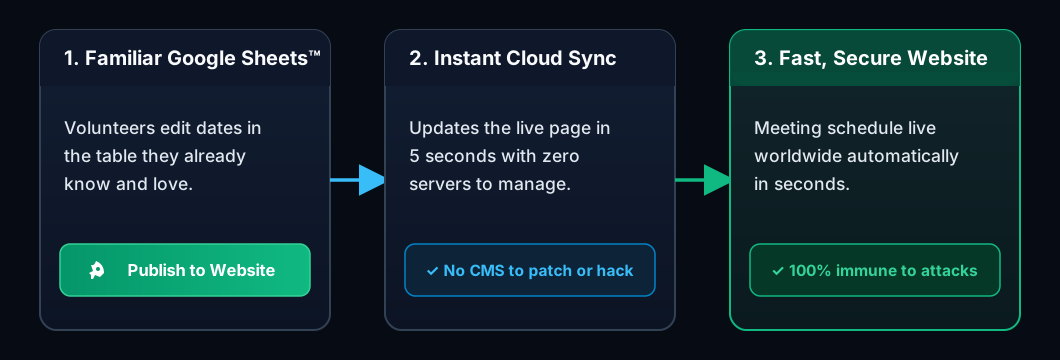
The Solution: A Push-Button Website
Instead of deploying a dynamic web server that runs 24 hours a day waiting for visitors, we migrated the entire public presence (manitobamorning.org) to a pure static architecture hosted on Amazon S3 and distributed globally via Amazon CloudFront CDN.
To keep the meeting schedule dynamic without a CMS, we connected the spreadsheet directly to the website:
Step 1: The Push-Button Toolbar in Google Sheets
Inside the club’s existing Google Sheets spreadsheet, we added a custom menu right into the standard Google Sheets toolbar:
Site Tools ▼
  ├── 🚀 Publish to Website
  └── 🌐 View Live Page
When a volunteer finishes updating next month's meeting dates, they simply click "Publish to Website."
Behind the scenes, a lightweight Google Apps Script™ automation reads the active rows, preserves formatting, and securely dispatches the updates to our cloud endpoint with a single click.
Zero technical training. Zero passwords to remember. One click from the spreadsheet they were already editing.
Step 2: Instant Cloud Automation
In the cloud, an automated serverless function receives the update:
-
It verifies the authorized publishing key so only club members can trigger changes.
-
It re-publishes the static HTML meeting page directly into secure Amazon S3 storage.
-
It immediately refreshes the global edge network so visitors see the new dates in less than three seconds.
There is no database that can be corrupted or hacked, no virtual server running 24/7 that can crash, and the club only pays fractions of a penny for the three seconds it takes to process the publish event.
Step 3: Fast, Frictionless Visitor Experience
When prospective guests visit manitobamorning.org/meeting-dates.html, their browser pulls the pre-rendered static page directly from the nearest edge network location.
Because the dates are already baked directly into the static HTML, the browser doesn't have to make extra database queries or wait on background scripts. The results speak for themselves: a 100 / 100 Performance Score on Google PageSpeed Insights.
Bonus Defense: Fortifying the Front Door
Eliminating Joomla solved the website's administrative headaches, but community clubs face another relentless nuisance: contact form spam.
Automated bots crawl club websites constantly, pumping fake SEO pitches, phishing links, and crypto scams into volunteer inboxes.
To solve this, we unified the meeting publisher with the club's contact form into the same serverless backend:
-
SPAM Escudo AI Classification: Inbound messages are evaluated in milliseconds using cryptographic honeypot tokens and semantic AI threat modeling.
-
Local Edge Heuristics: Zero-latency filters drop automated bot signatures—including Gmail dot-stuffing, suspicious HTML injection, and high-entropy gibberish names—before invoking external services.
-
Automated Email Routing: Legitimate inquiries are dispatched immediately to executive club members via Amazon Simple Email Service (SES), keeping volunteer inboxes clean.
Evolutionary Architecture: Building Only What You Need
A key principle of pragmatic engineering is deferring complexity until it is genuinely required.
Right now, the club’s officer list changes once a year. The webmaster handles that single update statically in two minutes.
Could we have built a multi-table database, authentication portals, and user permission roles to let officers update their own bios? Of course. But doing so would have introduced unnecessary code, testing overhead, and complexity for a task that happens once every 365 days.
When the club's executive officers change next, we can evaluate their needs. If manual updates ever become tedious, we can apply this exact same Google Workspace publishing pattern to the leadership page with push-button ease.
Architecture should evolve with your organization—not dictate how your volunteers work.
The Results
By replacing an obsolete Joomla CMS with Google Sheets and AWS Serverless, Manitoba Morning Toastmasters achieved:
| Metric | Legacy Joomla CMS | Eagna-Smart Serverless Architecture |
|---|---|---|
| Google PageSpeed Score | Often sluggish (50–70) | 100 / 100 Performance (0ms Blocking Time) |
| Monthly Hosting Bill | $15 – $30 / month | ~$0.05 / month (Pennies on Amazon S3) |
| Vulnerability Attack Surface | High (PHP, MySQL, CMS Plugins) | Near-Zero (No Server, PHP, or Database) |
| Security Patches Required | Monthly maintenance required | Zero (Fully Serverless & Managed) |
| Volunteer Training Needed | High (Complex CMS Dashboard) | 0 Hours (Edit Google Sheets & Click Publish) |
The Takeaway for Non-Profit Leaders & Webmasters
The most sophisticated architecture isn't the one with the most microservices, the largest database, or the heaviest CMS.
The most sophisticated architecture is the one that solves the human problem with the least possible friction.
If your organization or business is tired of babysitting brittle CMS platforms, paying bloated hosting retainers, or struggling to keep content up to date, take a step back and examine your true cadence of change. Often, the tools your team already uses every day—paired with lightweight cloud automation—are all you ever needed.