Many modern operators, freelancers, and entrepreneurs run more than one venture. You might operate an incorporated consulting firm, manage an e-commerce side project, and hold a separate real estate or media property.
The operational reality? All those vendor receipts, invoices, and subscriptions land in a single primary Gmail™ inbox.
When tax season arrives, sorting through that single inbox is a nightmare. Co-mingling business expenses across separate legal entities violates corporate tax boundaries, creates hours of untangling for bookkeepers, and risks costly reconciliation errors.
Multi-Entity Routing in Under 5 Seconds
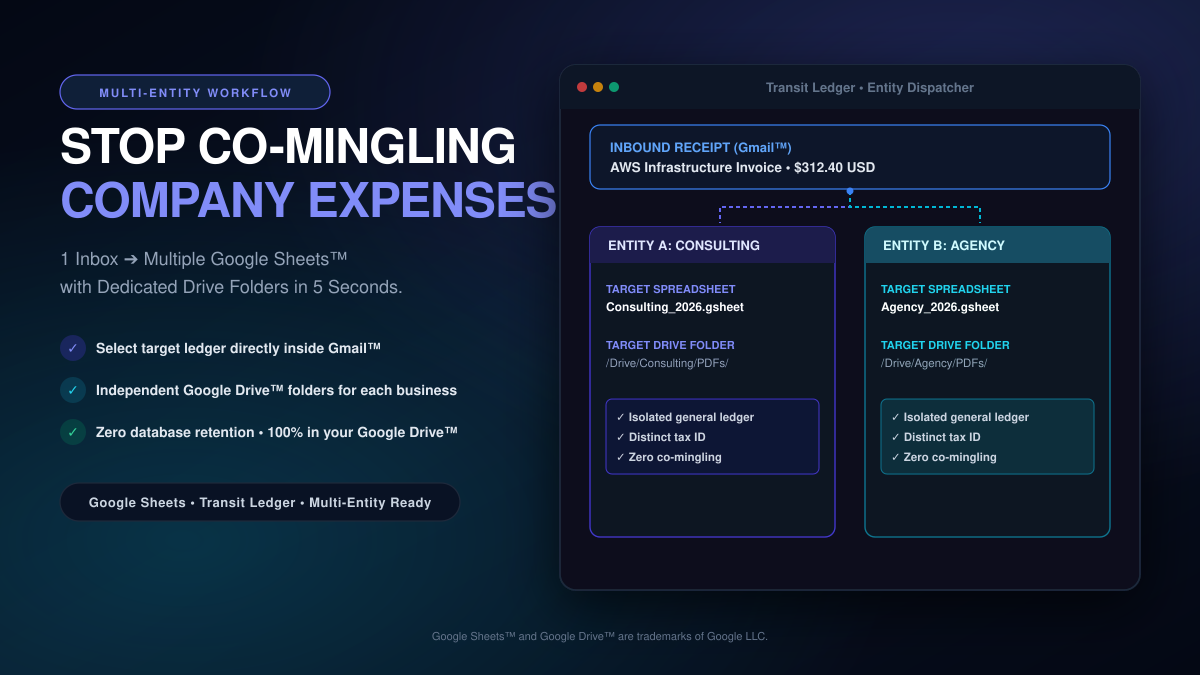
Transit Ledger solves the multi-company headache directly inside Google Workspace™. When an expense receipt lands in your inbox, you route it to the exact business entity in seconds:
- Entity-Specific Spreadsheets: Maintain independent Google Sheets™ spreadsheets for each legal entity or project (e.g., Consulting 2026 General Ledger vs. Agency 2026 Expenses).
- Dedicated Google Drive™ Folders: Invoices and source PDF receipts are automatically sorted and saved into the correct entity’s Google Drive™ folder, complete with direct clickable spreadsheet links.
- Isolated Permissions for Accountants: Share only the relevant Google Sheets™ spreadsheet and Google Drive™ folder with the bookkeeper or CPA assigned to that specific business, keeping other ventures completely private.
- Zero Database Retention: Transit Ledger never saves your receipts or financial data in an external database. Everything stays 100% inside your own Google Drive.
- No Inbox Snooping: We never scan your private email inbox in the background. Transit Ledger activates only on the specific receipt email you choose to log.
One inbox. Multiple ventures. Clean, tax-ready separation with zero manual data entry.
- Available on Google Workspace Marketplace: Install Transit Ledger
- Read our 5-month production case study: From Spreadsheet Chaos to Google Marketplace
- Explore features and architectural details at transit-ledger.com