For fractional bookkeepers, virtual CPAs, and outsourced accounting practices, scaling client volume usually hits a painful operational wall: keeping client records strictly separated.
When you manage 10, 20, or 40 separate small business clients, handling incoming invoices and receipts across different entities is fraught with friction: * Logging in and out of half a dozen proprietary accounting portals every day. * Paying expensive monthly software seat licenses just to invite external staff or client leads to review receipts. * The catastrophic risk of co-mingling records—accidentally dropping Client A’s software invoice into Client B’s expense item ledger.
Every Wednesday, we break down a distinct routing architecture engineered to solve real-world operational bottlenecks. Today’s architecture focuses on the Virtual CPA Multi-Client Workflow.
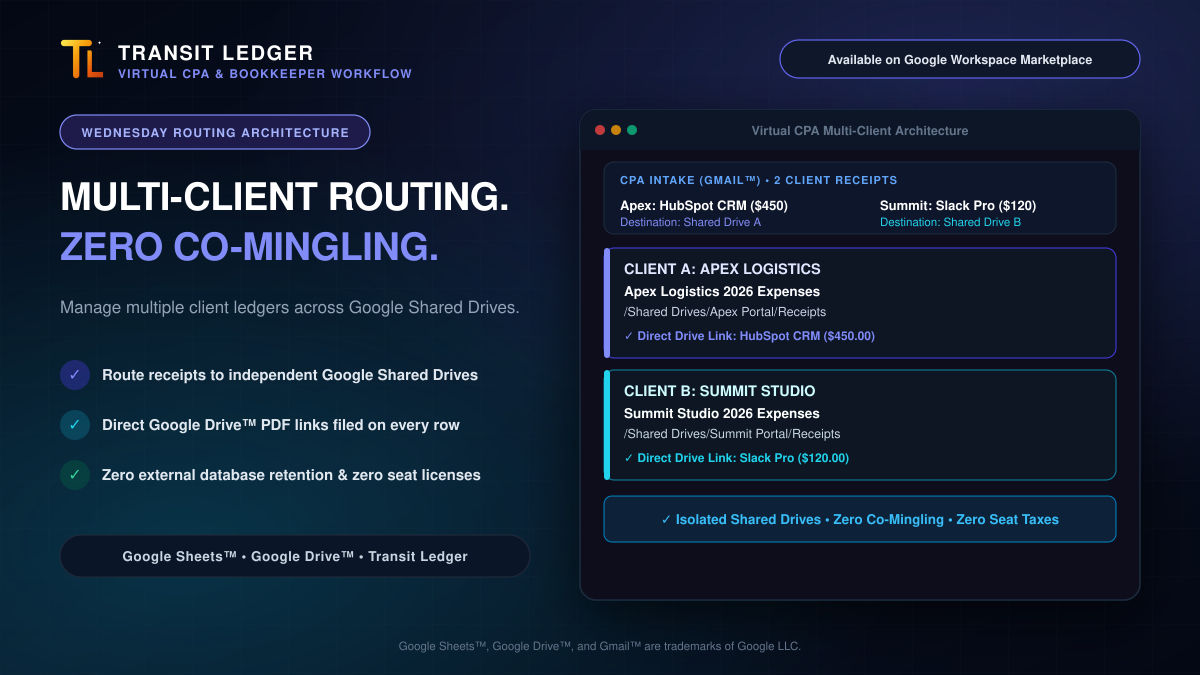
The Architecture: 1 Intake ➔ Dedicated Client Shared Drives
Instead of requiring dedicated software seats and siloed databases, this workflow uses native Google Workspace™ rails:
Here is how it functions in daily practice:
- Central Inbound Intake: Incoming receipts and vendor invoices forwarded from clients are processed through a single workflow inside Gmail™.
- Deterministic Entity Classification: Transit Ledger evaluates the transaction context and vendor routing rules, assigning the expense to the exact corresponding client entity.
- Dedicated Google Sheets™ Expense Ledgers: The vendor name, transaction date, currency, line items, and regional tax breakdowns (GST/HST, PST, Sales Tax) append automatically into that client’s dedicated Google Sheet.
- Isolated Google Shared Drive Storage: Standardized PDF copies are filed directly into each client’s private Google Shared Drive folder (e.g.,
/Shared Drives/Apex Portal/Receipts). - Direct Source Proof on Every Row: The corresponding row in the client’s spreadsheet records a direct clickable link to the stored PDF in their Shared Drive.
Three Core Advantages for Outsourced Bookkeepers
1. Zero Risk of Co-Mingled Records
Because client destinations are tied to separate Google Shared Drives with independent access control lists, permissions are strictly isolated. Client A’s internal team can only see their own Shared Drive and spreadsheet, while Client B never sees anything outside theirs. The CPA maintains centralized visibility across all client portals from their own Google account without switching logins.
2. $0 Added Software Seat Licenses
Enterprise expense management tools charge steep per-seat monthly fees for every collaborator or external reviewer. With Google Sheets and Google Shared Drives, sharing access with client founders, internal bookkeepers, or fractional CFOs is native and completely free ($0.00).
3. Zero External Database Retention
Your clients trust you with sensitive financial records. Transit Ledger does not store receipts, vendor data, or financial statements on external third-party database servers. The moment an expense is parsed, the data resides solely inside the client’s own Google Drive and Google Sheets. If an engagement ends, the client retains 100% of their organized financial history without exporting data from proprietary silos.
Turn Multi-Client Chaos into Quiet Order
Managing multiple client expense item ledgers doesn’t require juggling proprietary software stacks or risking administrative co-mingling.
Install Transit Ledger today on the Google Workspace Marketplace and configure clean, tax-ready routing across your client Google Shared Drives in minutes.
Google Sheets™, Google Drive™, Google Workspace™, and Gmail™ are trademarks of Google LLC.