As a company grows, one messy operational problem appears very quickly: budget visibility across departments.
Early on, every bill and receipt lands in the founder’s inbox and gets paid from a single account. But once you have dedicated leads for Marketing, Engineering, and Operations, that single pool breaks down:
- Department heads constantly ask finance how much budget they have left this quarter.
- Invoices get dumped into a single shared spreadsheet, making it tedious to isolate who spent what.
- Traditional expense software charges $10 to $25 per user each month just to give department leads a login to view their team’s receipts.
- Co-mingled folders create privacy headaches when department heads can see vendor contracts or software tools outside their domain.
Every Wednesday, we explore a distinct routing architecture designed around native Google Workspace™ rails. Today’s architecture focuses on Departmental Cost Centers.
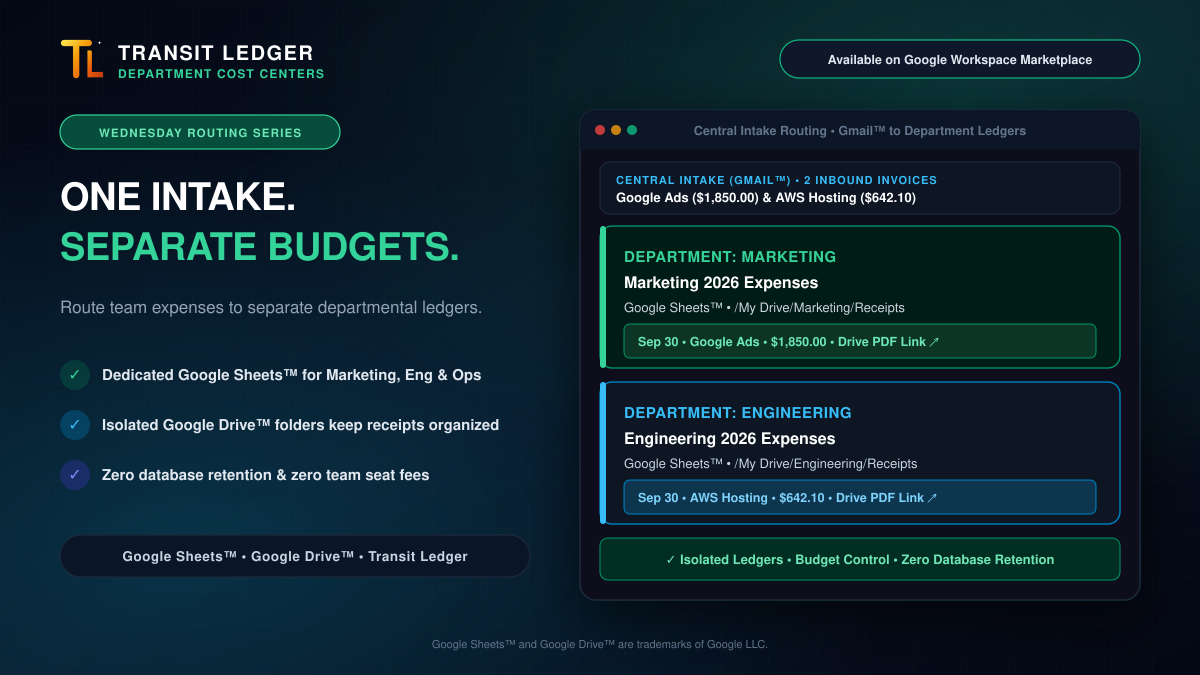
The Architecture: One Intake ➔ Isolated Department Ledgers
Instead of paying recurring software seat taxes to give department leads visibility, this architecture uses native Google Sheets™ and Google Drive™ permissions:
How It Works in Daily Operations
- Central Intake: Invoices arrive directly into the company inbox (or billing alias) inside Gmail™.
- Intentional Routing: When logging an expense with Transit Ledger, the operator selects the target cost center (e.g., Marketing or Engineering).
- Structured Spreadsheet Rows: The vendor, transaction date, currency, line items, and taxes are cleanly recorded on the active quarterly tab (
2026-Q3) of that department’s dedicated spreadsheet. - Organized Drive Folders: The receipt PDF is standardized and stored directly in the department’s folder (e.g.,
/My Drive/Marketing/Receipts). - Direct Proof Links: Every row includes a direct clickable link to the stored PDF in Google Drive, making record verification simple and immediate.
Three Operational Advantages
1. Clean Budget Isolation and Team Privacy
Engineering leads don’t need to sift through marketing campaign bills, and marketing managers don’t need to see server hosting costs. Each team has their own spreadsheet and folder. You control sharing using standard Google Drive permissions: invite the department lead as an editor or viewer with zero extra setup.
2. Zero SaaS Seat Taxes
Most expense tracking platforms force you to buy individual user licenses for every team lead who needs to check their department budget. By keeping your ledgers in Google Sheets, sharing a spreadsheet or Drive folder with your department heads costs $0.00.
3. Clean, Exportable Records
Transit Ledger appends pure transactional data without locking your records into a closed third-party ecosystem. Because rows are recorded cleanly without decorative totals or proprietary formatting, finance teams can export CSVs, build Google Looker Studio™ dashboards, or run pivot tables across quarters effortlessly.
4. Zero Database Retention
Your company receipts and financial details live exclusively in your own Google Drive and Google Sheets. Transit Ledger never retains your invoices or transaction numbers in a vendor database.
Give Your Teams Budget Clarity Today
You don’t need a complex SaaS stack to give your department leads clear, organized expense visibility.
Install Transit Ledger from the Google Workspace Marketplace and set up clean, partitioned departmental routing in minutes.
Google Sheets™, Google Drive™, Google Workspace™, and Gmail™ are trademarks of Google LLC.