Earlier this week, we explored Part 1 of Statement Mode: solving the multi-line invoice dilemma when a single receipt (like a Home Depot or Amazon Business order) contains 15 distinct line items.
Today, we are looking at the operational backbone of monthly accounting: Bank and Credit Card Statements.
Every month, business owners and bookkeepers receive multi-page PDF statements from financial institutions like Chase, Amex, or Silicon Valley Bank. And every month, converting those statements into workable data creates an enormous operational bottleneck.
Engineering in the Open — Feature Preview: Statement Mode is currently in active development for Transit Ledger, slated for release in Q4 2026. Here is an architectural preview of how we are bringing multi-page financial statements directly into Google Sheets with Zero Database Retention and fair processing rules.
The Month-End Statement Bottleneck
When a 4-page credit card statement arrives at month-end, small business operators typically face three bad options:
-
Manual Data Entry:
Typing 40 to 80 transactions line by line into a spreadsheet. It is tedious, mentally draining, and prone to costly keystroke typos on dates and decimal amounts. -
Copy-Pasting from PDF Readers:
Highlighting tabular text in a PDF viewer and pasting it into a spreadsheet. Almost invariably, multi-column tables scramble into a single unformatted text column, requiring half an hour of manual cleanup. -
Cryptic Bank CSV Exports:
Downloading raw transaction CSVs from the online banking portal. While fast, bank CSVs often come with cryptic merchant strings (SQ *COFFEE 29482), missing contextual tags, and—most importantly—they are completely severed from the official PDF statement that your tax preparer or accountant actually requires for substantiation.
None of these workflows respect a founder’s or bookkeeper’s time.
The Architecture: Multi-Page Statement Intake
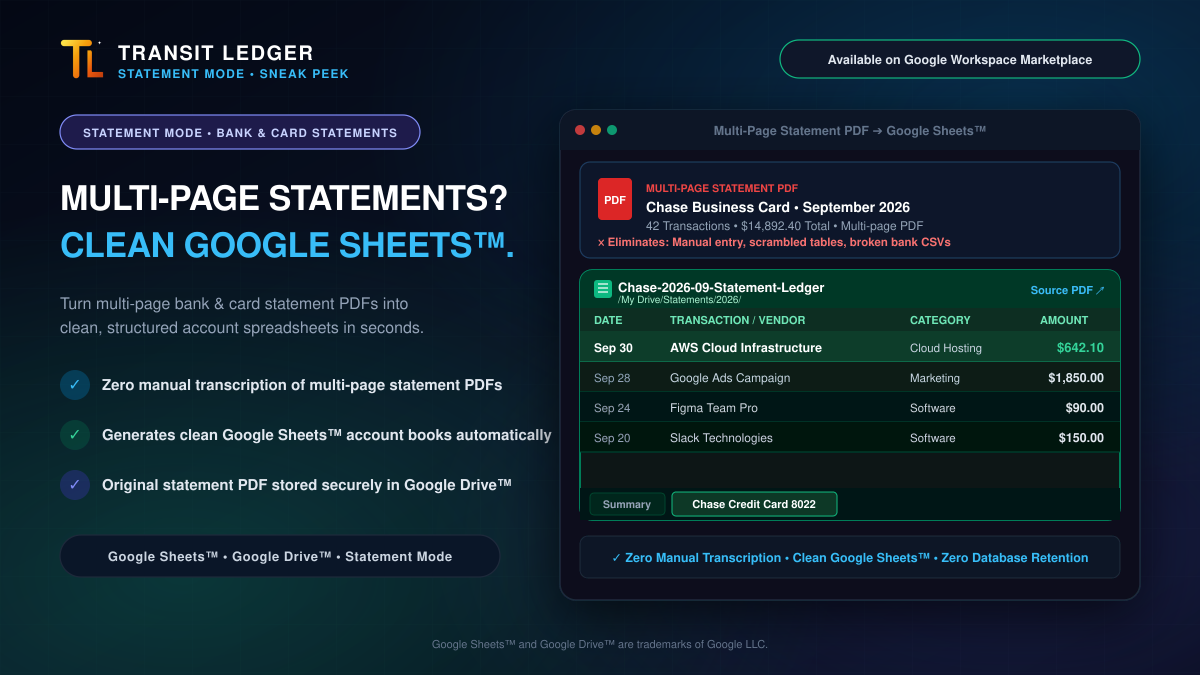
Transit Ledger Statement Mode is designed to handle multi-page monthly statements with the same zero-database architecture that powers our single-receipt pipeline:
When you direct a monthly bank or credit card statement to Transit Ledger, the engine executes a structured pipeline:
-
Secure Document Filing:
The complete, multi-page statement PDF is filed directly into your designated Google Drive statements folder (e.g.,/My Drive/Statements/2026/). -
Dedicated Account Book Generation:
Rather than dumping 50 statement lines into your everyday operating expense ledger, Transit Ledger creates a dedicated, cleanly structured Google Sheets account spreadsheet (e.g.,Chase-2026-09-Statement-Ledger). The spreadsheet organizes records into focused tabs: an accountSummarytab and a dedicated account activity tab (e.g.,Chase Credit Card 8022). -
Tabular Data Extraction:
Transactions across all pages are parsed into clean, structured spreadsheet columns:
- Date: Normalized ISO calendar dates.
- Transaction / Vendor: Readable merchant descriptions.
- Reference ID: Statement reference numbers and transaction codes for reference.
- Category: Normalized spending categories.
- Amount: Properly formatted currency values.
- Linked Source Substantiation:
The formula bar and header of the generated sheet contain a direct clickable link to the source PDF in Google Drive. When an accountant or tax advisor needs to verify a number, the primary documentation is one click away.
Why Statements Are Metered by the Page (And the Fair Rule We Enforce)
When you log a standard vendor invoice in Transit Ledger, the engine focuses on key financial totals (vendor, invoice date, subtotal, tax splits, and total) to create one balanced row in your master ledger—processed as a single credit, regardless of how many pages the invoice PDF contains. Receipt and invoice intake doesn’t count pages because the engine isn’t attempting to transcribe every incidental line across the entire document.
Monthly bank and credit card statements are fundamentally different. A statement requires exhaustive row-level extraction—reading, normalizing, and writing dozens of individual transactions per page into a dedicated account spreadsheet. Because the computational heavy lifting and data volume scale directly with transaction rows, Statement Mode is metered per page.
That architectural difference introduces an obvious problem: bank fine print.
A 5-page credit card statement often has 3 pages of real account transactions, followed by 2 pages of cardholder agreements, interest rate schedules, dispute disclosures, and trailing blank filler.
Many document processing platforms blindly charge customers for every physical page in a PDF payload, burning 40% of their subscription balance on legal fine print.
Transit Ledger operates on Fair Processing Rules:
- Smart Page Classification: Our processing engine evaluates each page in the statement payload and identifies pages containing actual financial transactions.
- No Fine-Print Tax: You are only charged for pages containing actual financial transactions. If a page contains only disclosures, fee schedules, privacy notices, or blank filler, it does not consume your balance. Those pages are processed at zero credit cost.
- Heavy Lifting Only: You only consume allotment on pages where Transit Ledger actually does the heavy lifting of extracting and writing structured data into your Google Sheets ledger.
What Statement Mode Does (and What It Doesn’t)
In engineering transparent software, clarity about scope is just as important as showcasing capabilities:
-
What Transit Ledger Does:
We eliminate the manual data entry bottleneck. We ingest complex, multi-page statement PDFs, extract structured transaction rows into Google Sheets, and store the substantiated PDF proof in your Google Drive with Zero Database Retention. -
What Transit Ledger Does Not Do:
Transit Ledger is not general ledger accounting software. We do not perform automated bank reconciliation matching, balance sheet adjusting entries, or statement-to-invoice clearance checks. Those reconciliation workflows belong in your accounting software or with your professional bookkeeper.
Our job is to deliver the clean, structured data and verified proof that make downstream reviews effortless.
Zero Database Retention: Your Statements Remain Yours
Financial statements are among the most sensitive documents a business handles. Traditional SaaS intake tools store statement PDFs and transaction histories on third-party servers indefinitely.
Transit Ledger operates on a strict Zero Database Retention model:
- No Third-Party Data Storage: Your statement PDFs live in your Google Drive. Your transaction rows live in your Google Sheets.
- No Inbox Snooping: Transit Ledger never crawls your inbox or monitors background communications. It processes only the specific statement document you choose to log.
- Open Tabular Ownership: Your data is stored in standard Google Sheets tabs with open grid lines, ready to be exported to CSV or shared with your fractional CFO at any time.
Roadmap: Arriving in Q4 2026
Statement Mode for multi-line invoices and bank & card statements is currently in active development as part of our Q4 2026 release roadmap.
In the meantime, single-receipt intake with automatic Drive filing and zero database retention is live today.
👉 Available on Google Workspace Marketplace: Install Transit Ledger
Google Sheets™, Google Drive™, and Google Workspace™ are trademarks of Google LLC.