Most expense management software forces teams into an artificial routine: “Download our app. Open the camera. Take a photo of the receipt. Wait for our cloud to parse it.”
In actual business operations, financial documents never arrive through a single channel:
- Some land as vendor invoices in your Gmail™ inbox while you are triaging email on your computer or phone.
- Others arrive as batches of PDF invoices uploaded directly into a project folder in Google Drive™.
- Many come from non-Gmail email accounts, team members, or automated vendor billing rules that need forwarding.
- Some are paper receipts, desktop scans, or ad-hoc files sitting on your computer.
Forcing four completely different operational habits into a single rigid intake pipeline creates resistance. Founders delay logging receipts, team members forget to download the app, and bookkeeping backlogs accumulate.
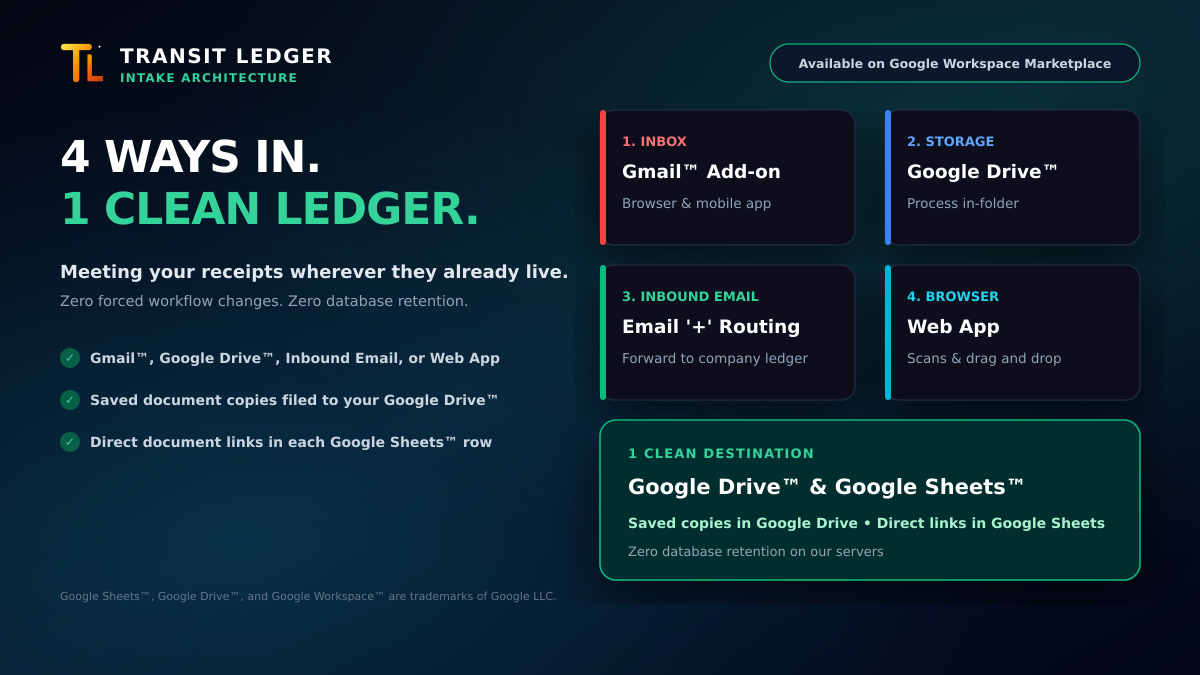
We engineered Transit Ledger with four flexible intake doors that meet the document wherever it already lives.
The Four Intake Surfaces
Whichever door a receipt enters through, Transit Ledger extracts the data and files it into the exact same standardized records:
- The Gmail™ Add-on (Browser & Mobile App): When you receive an invoice in Gmail, Transit Ledger opens directly in your sidebar on desktop or inside the official Gmail mobile app. You can review the extraction, confirm the target company, and log it immediately without switching apps.
- The Google Drive™ Add-on: When vendors or clients drop a batch of invoice PDFs directly into a Google Google Drive folders, you can process them in place. There is no need to download files to your local computer just to re-upload them to an external portal.
- Inbound Email with
+Alias Routing: For receipts in non-Gmail clients, invoices forwarded by staff, or automated vendor forwarding rules, forward them directly to your dedicated intake email address. Using standard plus-addressing (such asalias+Company@invoices.transit-ledger.com), Transit Ledger routes each receipt directly to that specific company’s Google Sheets™ ledger. - The Web App (Desktop & Mobile): For paper receipts, desktop scans, or ad-hoc files, drag and drop documents directly into the web application from any browser.
One Clean Destination: Zero Database Retention
The intake surface changes based on your context, but the architectural integrity never varies:
- Your Google Drive™ Archive: A saved copy of each processed document is filed directly into your designated Google Google Drive folders (or Google Shared Drive).
- Your Google Sheets™ Ledger: A clean, standardized transaction row is appended to your spreadsheet, complete with date, vendor, tax breakdown, and a direct link to the saved document copy in Google Drive. For receipts logged through the Gmail Add-on, each row also links directly back to the message in Gmail™.
- Zero Database Retention: Your receipts live in your Google Drive, not our database. We never retain your financial documents on our servers.
You don’t need to change how you work to maintain clean, tax-ready records.
- Available on Google Workspace Marketplace: Install Transit Ledger
- Read our production launch story: From Spreadsheet Chaos to Google Marketplace
- Explore features and architectural details at transit-ledger.com