As soon as a real estate investor or property manager acquires a second property, one administrative headache surfaces immediately: keeping property expenses completely separate.
Whether managing a residential duplex and a commercial retail unit, or several multi-family rentals across different holding entities, receipts arrive continuously from every direction:
- Supply run receipts from Home Depot for emergency plumbing repairs.
- HVAC maintenance contracts and commercial roof inspections.
- Municipal water and utility invoices delivered by email.
- Landscaping, snow removal, and routine turnover bills.
When those documents land in one personal inbox or get paid from a single card, chaos follows. At tax time, sorting mixed transactions into accurate Schedule E or T776 expense lines requires hours of tedious forensic review. Worse, co-mingling funds and receipts across separate legal entities risks compromising the liability shield between your properties.
Every Wednesday, we explore a distinct routing architecture designed on native Google Workspace™ rails. Today’s architecture focuses on Real Estate & Property Management.
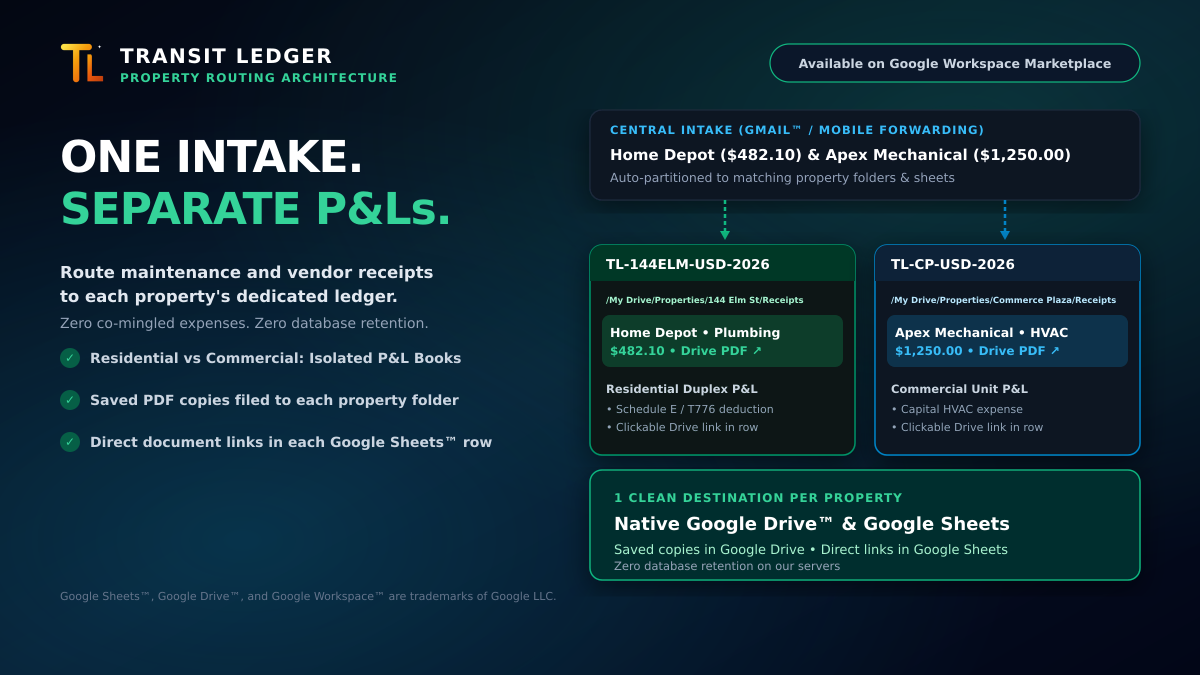
The Architecture: One Intake ➔ Isolated Property P&L Books
Instead of paying $150 to $300 every month for bloated property management portals, this architecture routes invoices directly from Gmail™ into dedicated Google Sheets™ workbooks and organized Google Drive™ folders:
How It Works in Daily Operations
- Central Intake: Receipts arrive in Gmail on your desktop or phone, or get forwarded via mobile alias addressing (e.g.,
alias+elm@...versusalias+commerce@...). - Intentional Property Routing: With Transit Ledger, you designate the destination property profile with one selection.
- Structured Spreadsheet Rows: Transaction date, vendor, total, and tax breakdowns are logged directly into that property’s dedicated ledger (
TL-144ELM-USD-2026orTL-CP-USD-2026). - Organized Google Drive Folders: The original receipt file is saved into the property’s private folder (e.g.,
/My Drive/Properties/144 Elm St/Receipts). - Direct Google Drive Links: Every spreadsheet row includes a clickable Google Drive link directly anchored to the saved PDF, allowing immediate verification without manual folder hunting.
Four Operational Advantages for Property Owners
1. Zero Co-Mingling Across Entities
A plumbing repair on 144 Elm St never touches your Commerce Plaza accounts. Keeping separate sheets and folders maintains clean corporate boundaries between holding entities, protecting your legal entity separation without adding administrative complexity.
2. Clean Tax Prep Without Midnight Sifting
When your accountant prepares Schedule E (US) or Form T776 (Canada), you don’t hand them an unorganized shoebox or a jumbled multi-property export. You hand them clean, dedicated spreadsheets with categorized totals and direct links to every invoice.
3. $0 Collaborator Access
Traditional property management platforms charge per-unit subscription fees and demand paid seat licenses just to grant your accountant or business partner access. With Google Workspace, you share access to specific property sheets or Google Drive folders using standard Google permissions—costing $0.00 in additional seat taxes.
4. Permanent Data Ownership & Zero Database Retention
Your receipt PDFs live in your Google Drive. Your transaction ledgers live in your Google Sheets. Transit Ledger never retains your invoices or financial histories in an external vendor database. If you ever pause or change tools, your historical records stay intact in your own Google Drive forever.
Organize Your Property Expenses Today
Stop paying heavy SaaS subscriptions just to separate property receipts.
Install Transit Ledger from the Google Workspace Marketplace and configure clean property-level routing in minutes.
Google Sheets™, Google Drive™, Google Workspace™, and Gmail™ are trademarks of Google LLC.